

SoundCloud 
Section titled “SoundCloud ”Music Assistant has support for Soundcloud. Contributed by gieljnssns. Maintained by robsonke
Features
Section titled “Features”| Subscription FREE | Yes |
| Self-Hosted Local Media | No |
| Media Types Supported | Artists, Albums, Tracks, Playlists |
| Recommendations Supported | No |
| Lyrics Supported | No |
| Radio Mode | No |
| Maximum Stream Quality | Lossy AAC (256kbps) |
| Login Method | Cookie |
Configuration
Section titled “Configuration”Two fields need to be completed to use this source, Client id and Authorization. To obtain these proceed as follows:
- Delete your cookies for Soundcloud.
- Go to Soundcloud.
- Open the
Inspecttool (F12 on most browsers). - Go to the page
Networkon the inspect terminal. - Login.
- Search for
auth. - In one of the requests you will find the
client_id - And for the OAuth token we need the
oauth_tokencookie on the soundcloud.com domain prepended with “OAuth ”
client_id: string of 32 bytes alphanumeric
oauth_token: string inside the cookie value
Client id
Section titled “Client id”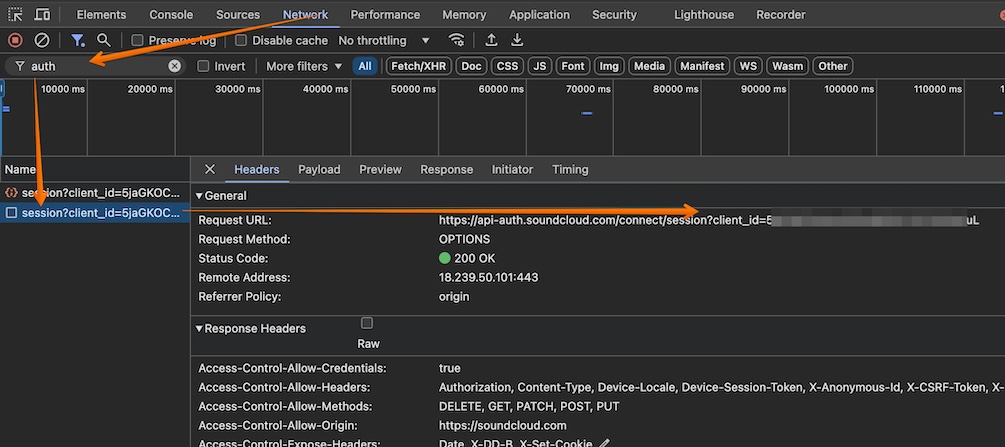
OAuth token
Section titled “OAuth token”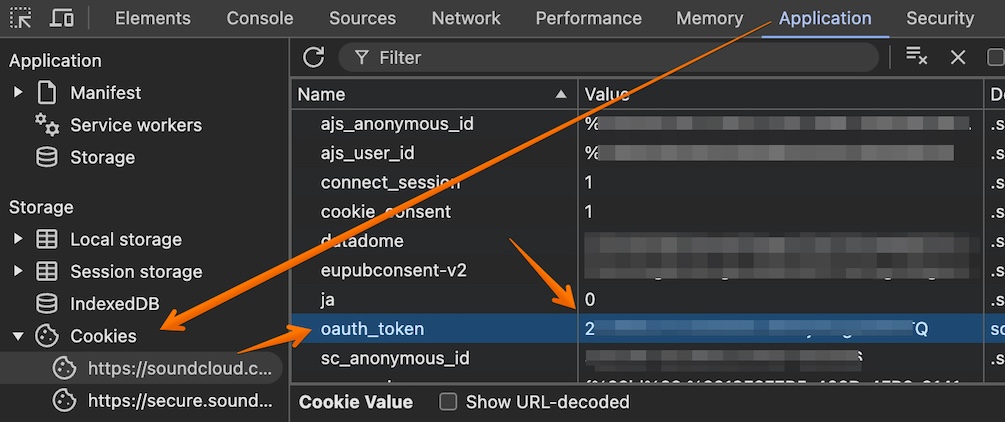
Example snippet for the Music Source configuration step (OAuth and client_id are NOT real, use yours):
client_id = 5Hvc9wa0Ejf092wj3f3920w3F920asuLAuthorization = OAuth 2-26432-21446-asdif2309fQKnown Issues / Notes
Section titled “Known Issues / Notes”- Artists synced from Soundcloud are actually Soundcloud users.
- If a song by artist X is uploaded by user Y, this song belongs to the artist Y in Music Assistant