


Music Assistant has support for using Plex (MusicLibrary). Contributed by micha91 and maintained by anatosun
Features
Section titled “Features”| Subscription FREE | Yes |
| Self-Hosted Local Media | Yes |
| Media Types Supported | Artists, Albums, Tracks, Playlists |
| Recommendations Supported | Yes |
| Lyrics Supported | No |
| Radio Mode | No |
| Maximum Stream Quality | Lossless FLAC (192 kHz, 24 bit) |
| Login Method | Password |
- Search the Plex server
Configuration
Section titled “Configuration”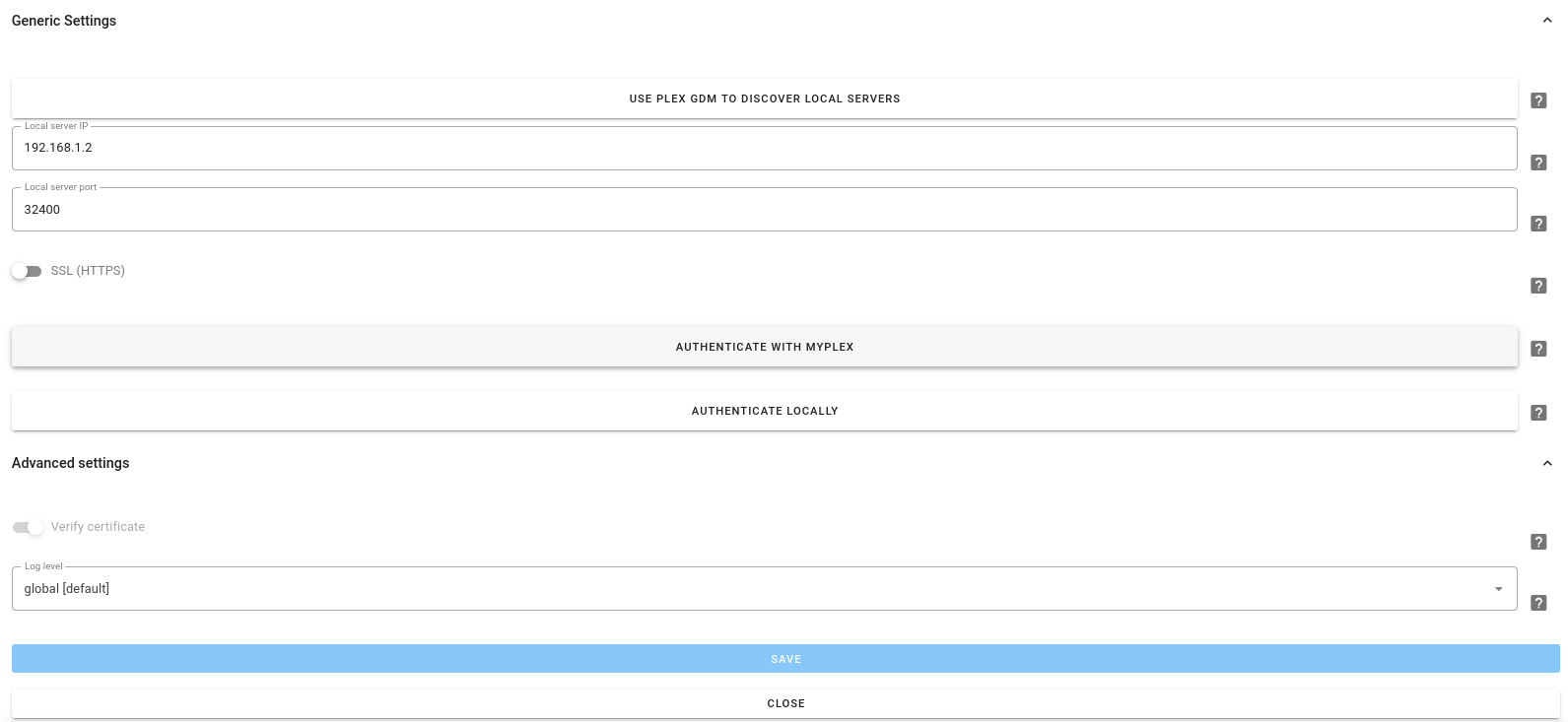
- Click the
Use Plex GDM to discover local serversbutton, this should discover your local server and prefill thelocal_server_ipandlocal_server_portfields - If GDM discovery fails, the 2 fields mentioned above will be filled with “Discovery failed… ”. In this case, please add the IP address (without any http:// prefix) of your server, and the port (usually 32400) that you are exposing it on
- Select the
SSL (HTTPS)toggle if required. If this setting is enabled an option in the Advanced Settings will be activated which requires the certificate to be verified (default is on) - If you login to Plex via MYPLEX.TV, click the
Authenticate on MYPLEX.TVbutton, this may trigger your browserpop-updetection, so watch out for that, authenticate as you normally would for Plex - If you have configured Plex to allow local connection without authentication (see below), click the
Authenticate Locallybutton - Select the Music library that you would like to use
- Save the settings
Plex Configuration
Section titled “Plex Configuration”- If you want to allow Music Assistant to connect to Plex without authentication, go to your Plex configuration, Settings / Network. In the field labeled
List of IP addresses and networks that are allowed without authenter the IP address of the computer running Music Assistant, andSave Changes
Known Issues / Notes
Section titled “Known Issues / Notes”- A Plex source is always bound to a user account and a library
- If you have multiple libraries, you need to add the Plex provider multiple times
- If you have multiple Plex accounts, which have their own playlists, you can also add them as separate provider instances