

MA get_library Action
Section titled “MA get_library Action”This action allows you to retrieve the full details of the items from the library
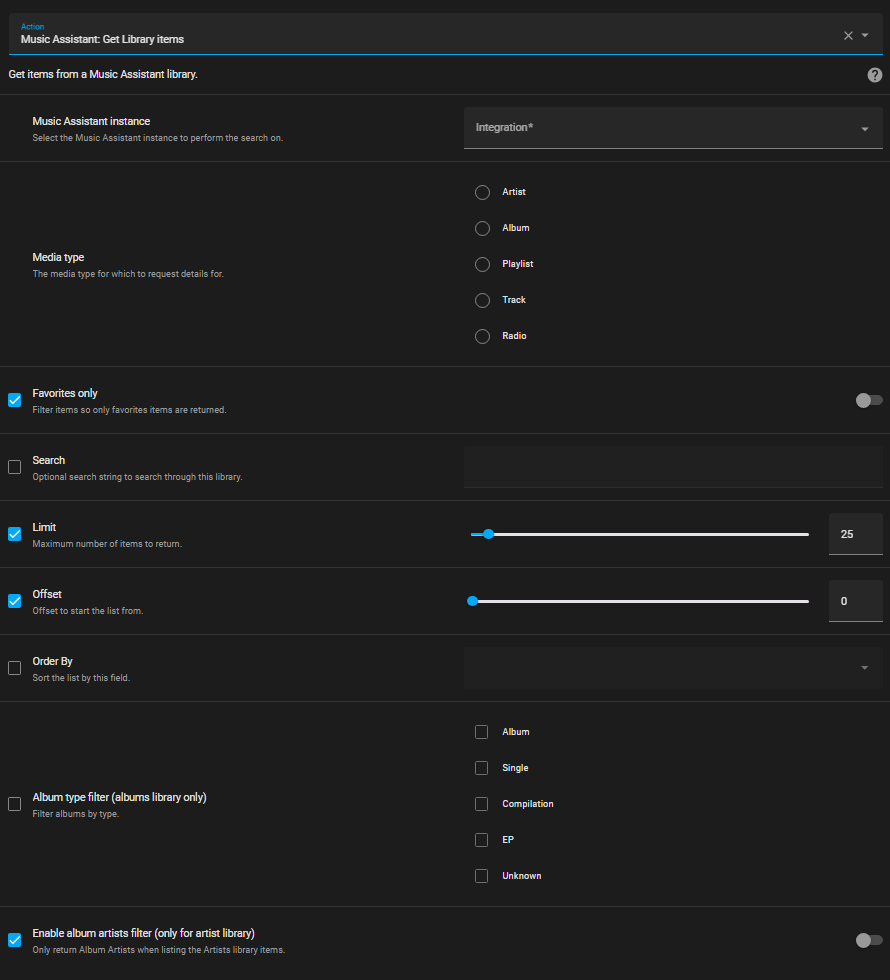
As can be seen there are a large number of filter options available.
The favorite option works in three ways:
- If the option is unchecked on the left then favorites and non-favorites will be returned
- If the option is checked on the left but the switch on the right is off then only non-favorites will be returned
- If the option is checked on the left but the switch on the right is on then only favorites will be returned
The returned JSON is extensive. The returned data can be used in templates.
Example
Section titled “Example”In this example a queue of 10 random tracks is created.
script: create_random_queue: mode: single sequence: - service: music_assistant.get_library data: limit: 10 media_type: track config_entry_id: 01JEXNDHT21V0BHJXM7A5SZANV order_by: random response_variable: random_tracks - repeat: count: "{{ random_tracks['items'] | length }}" sequence: - action: music_assistant.play_media data: media_id: "{{ random_tracks['items'][repeat.index - 1].uri }}" media_type: track enqueue: add target: entity_id: media_player.ma_kitchen_speaker