

Music Assistant 2.8: Let's get this party started!

After months of working with the community on new and exciting arrangements, Music Assistant is ready to take center stage once again. Today, we’re thrilled to present… drum roll 🥁… version 2.8!
Since our last major update, the team has been listening to your feedback, squashing bugs, and building features that bridge the gap between different audio ecosystems. Today, we’re releasing key changes to make your home audio smarter, more social, and more unified than ever before. This release is a testament to our community’s passion, and we can’t wait for you to hear what’s queued up.
On that note, the State of the Open Home 2026 is just around the corner, and this year it’s going live 🎉. On April 8, 2026, the community will gather in Utrecht, the Netherlands, to celebrate what we’ve built, share successes, and look to what’s ahead. Join our audience and you may just get to see Sendspin (more on that below) in action too 👀. Grab your tickets here and secure your spot today.
”All Together Now”
Section titled “”All Together Now””Merge your players
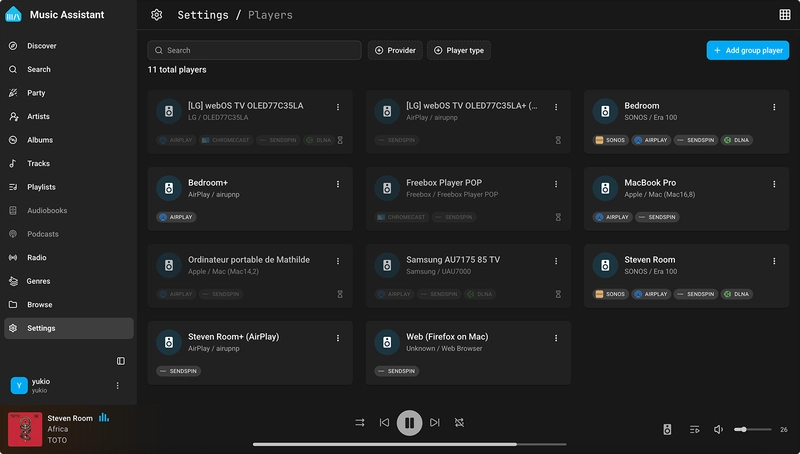
What happens when AirPlay, Chromecast, and DLNA walk into a high-end soundbar? Before, chaos. Up until today, Music Assistant treated these protocols as three different speakers: it was messy, crowded, and made your Home Assistant dashboard look like a cacophony of controls.
But that was then, and this is now. In version 2.8, we move from clutter to clarity with Player Merging. Marcel has implemented some sophisticated logic magic 🪄 that identifies when multiple protocols (for example, Airplay and DLNA) belong to the same physical speaker. The result is you’ll only see one player in your dashboard. Simply pick the speakers you want to use, put them in a group, and Music Assistant handles the rest behind the scenes.
It’s worth noting that because we’re fundamentally reworking how players are identified, this is a “breaking change” for Home Assistant users. In other words, you might need to reconfigure some of your Player Groups or Home Assistant automations. But trust me, once you see your clean list of players all in sync, you’ll never look back!
”Moving On Up”
Section titled “”Moving On Up””Sendspin’s on a roll
This iteration marks a major milestone for Sendspin, our new multimedia streaming and synchronizing protocol that’s been building momentum since its debut. Sendspin is open source, free to use, and can seamlessly stream high-fidelity audio, album art, and visualizer data to all your home devices. When we released the tech preview for Sendspin in version 2.7, we invited all developers and DIY audio hobbyists into the mix to help us build and test in the open…
And the collaboration was a hit. With your input, we’ve been able to make major progress: the specification is nearly complete, implementations are almost finished, and an ecosystem of Sendspin-compliant clients has emerged. Version 2.8 showcases this evolution with significant performance and quality improvements, bringing Sendspin closer to graduation from preview status.
Sendspin is moving on up, but before we hit the chorus, a little moment for the bridge…
”Take It To The Bridge”
Section titled “”Take It To The Bridge””Smooth streaming
This is the one we’ve all been waiting for. Before this release, if you wanted to group a Sonos speaker with a Google Nest (via Chromecast), you were out of luck.
In 2.8, we’ve introduced Sendspin Bridges, which “wraps” Sendspin around your existing Chromecast and AirPlay-capable devices (such as Sonos). By turning these devices into Sendspin players, Music Assistant can now treat them as one big, happy family. You can finally create a Sendspin Group that mixes and matches brands, keeping them in perfect sync. Your Sonos in the lounge and your Chromecast in the kitchen are finally on the same team!
”Rock DJ”
Section titled “”Rock DJ””Party mode, now built in
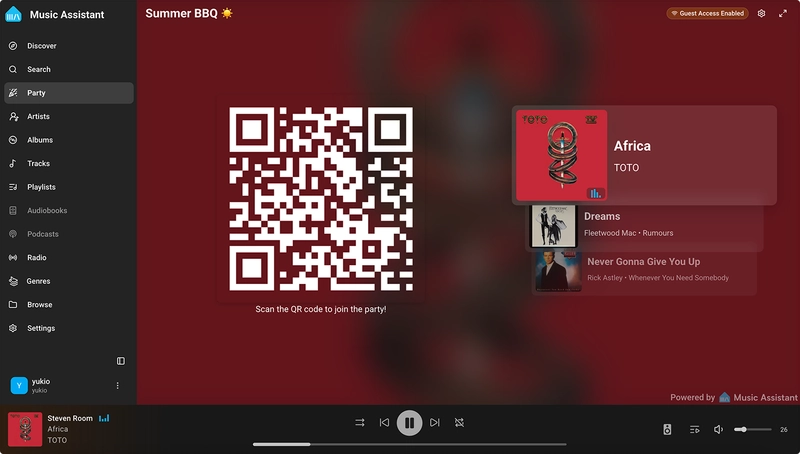
Tired of your friends hovering over your shoulder to ask, “Can you play some 90s Eurodance?” We’ve got you. Or rather, @apophisnow’s got you!
Enter the Party! You can now turn any screen into a party dashboard for any player. Your guests simply scan a QR code with their phones, and boom, they’re in a sleek, “guest-only” version of the Music Assistant interface. No app downloads, no logins, and – most importantly – no sharing your Wi-Fi password. They can search your library, add tracks to the queue, and even use credits to “boost” songs to the top. You stay in control; they get to be the DJ.
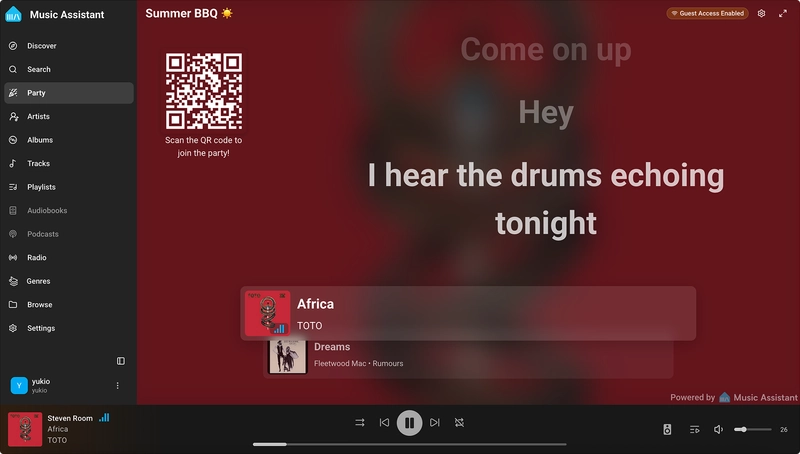
And we didn’t stop at the queue. Karaoke Mode is now built directly into the dashboard. When enabled, the Party Plugin dashboard can display full-screen lyrics, highlighting each line as it plays. Time to get out those mics and start singing – or let your guests take the spotlight 😉.
”The Choice is Yours”
Section titled “”The Choice is Yours””Explore by mood
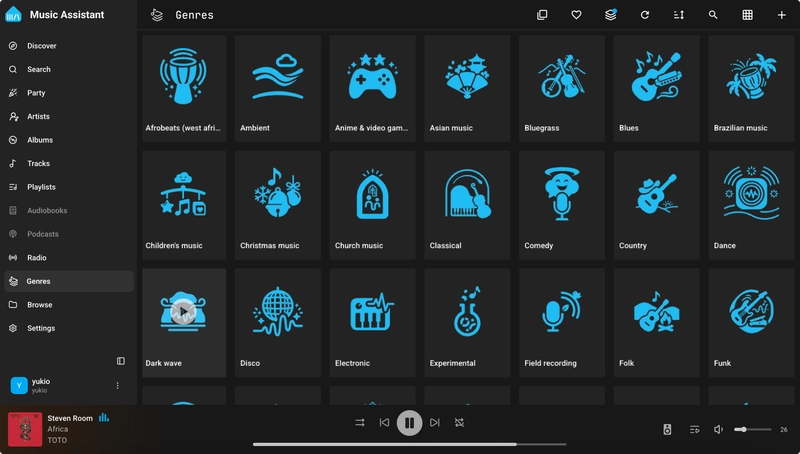
Until now, finding music in your library meant searching for a specific artist or album. But as we all know, music isn’t always about names, it’s about a vibe. In 2.8, @jozefKruszynski has contributed Genre Support to make choosing music for a mood a whole lot easier.
Instead of trawling through an endless list of artists, you can now play music from a specific genre with a single click. Want to turn your living room into a jazz lounge? Just hit “play” on the Genres page, and Music Assistant will curate a collection of tracks, helping you find an ambiance that’s just right.
”Unstoppable”
Section titled “”Unstoppable””Music Assistant in motion
In addition to our core features, 2.8 introduces a wave of new player providers, music sources and plugins to expand your musical horizons:
- Several player providers have been added, such as HEOS and Dashie Kiosk
- New music sources like Bandcamp, YouSee Musik, Emby Music, NFS Fileshare, SomaFM Radio, ORF Radiothek, Yandex Music, Zvuk Music, and Kion Music can now be added to enrich your music library
- The new AriaCast plugin allows you to use AriaCast with Music Assistant
- Airplay 2 now supports password pairing
- There is now a dedicated “Background Tasks” section in the settings that shows you which tasks are running in the background. It also allows you to schedule tasks at a specific time, so that your favourite daily podcast is ready when you sit down for your morning coffee.
Want to hear more? Head to the release notes for a full breakdown of the new, exciting changes.
”Go Your Own Way”
Section titled “”Go Your Own Way””Your home, your music, your way
Music Assistant helps conduct your entire setup seamlessly, and on your terms. New here? Jump in with our getting started guide and bring your system into harmony. We’re continuing to build and refine with each release and, as always, your voices are instrumental in what comes next. Drop us a line in the comments or on Discord, or add your ideas directly to our feature requests page. We’d love to hear from you!